

HP Certified HPE6-A84 Dumps Questions Valid HPE6-A84 Materials
Current HPE6-A84 Exam Dumps [2024] Complete HP Exam Smoothly
NEW QUESTION # 18
Refer to the scenario.
# Introduction to the customer
You are helping a company add Aruba ClearPass to their network, which uses Aruba network infrastructure devices.
The company currently has a Windows domain and Windows CA. The Window CA issues certificates to domain computers, domain users, and servers such as domain controllers. An example of a certificate issued by the Windows CA is shown here.

The company is in the process of adding Microsoft Endpoint Manager (Intune) to manage its mobile clients.
The customer is maintaining the on-prem AD for now and uses Azure AD Connect to sync with Azure AD.
# Requirements for issuing certificates to mobile clients
The company wants to use ClearPass Onboard to deploy certificates automatically to mobile clients enrolled in Intune. During this process, Onboard should communicate with Azure AD to validate the clients. High availability should also be provided for this scenario; in other words, clients should be able to get certificates from Subscriber 2 if Subscriber 1 is down.
The Intune admins intend to create certificate profiles that include a UPN SAN with the UPN of the user who enrolled the device.
# Requirements for authenticating clients
The customer requires all types of clients to connect and authenticate on the same corporate SSID.
The company wants CPPM to use these authentication methods:
EAP-TLS to authenticate users on mobile clients registered in Intune
TEAR, with EAP-TLS as the inner method to authenticate Windows domain computers and the users on them To succeed, EAP-TLS (standalone or as a TEAP method) clients must meet these requirements:
Their certificate is valid and is not revoked, as validated by OCSP
The client's username matches an account in AD
# Requirements for assigning clients to roles
After authentication, the customer wants the CPPM to assign clients to ClearPass roles based on the following rules:
Clients with certificates issued by Onboard are assigned the "mobile-onboarded" role Clients that have passed TEAP Method 1 are assigned the "domain-computer" role Clients in the AD group "Medical" are assigned the "medical-staff" role Clients in the AD group "Reception" are assigned to the "reception-staff" role The customer requires CPPM to assign authenticated clients to AOS firewall roles as follows:
Assign medical staff on mobile-onboarded clients to the "medical-mobile" firewall role Assign other mobile-onboarded clients to the "mobile-other" firewall role Assign medical staff on domain computers to the "medical-domain" firewall role All reception staff on domain computers to the "reception-domain" firewall role All domain computers with no valid user logged in to the "computer-only" firewall role Deny other clients access
# Other requirements
Communications between ClearPass servers and on-prem AD domain controllers must be encrypted.
# Network topology
For the network infrastructure, this customer has Aruba APs and Aruba gateways, which are managed by Central. APs use tunneled WLANs, which tunnel traffic to the gateway cluster. The customer also has AOS-CX switches that are not managed by Central at this point.
# ClearPass cluster IP addressing and hostnames
A customer's ClearPass cluster has these IP addresses:
Publisher = 10.47.47.5
Subscriber 1 = 10.47.47.6
Subscriber 2 = 10.47.47.7
Virtual IP with Subscriber 1 and Subscriber 2 = 10.47.47.8
The customer's DNS server has these entries
cp.acnsxtest.com = 10.47.47.5
cps1.acnsxtest.com = 10.47.47.6
cps2.acnsxtest.com = 10.47.47.7
radius.acnsxtest.com = 10.47.47.8
onboard.acnsxtest.com = 10.47.47.8
You have created a role mapping policy as shown in the exhibits below.
What is one change that you need to make to this policy?
- A. Change the rules evaluation mechanism to first applicable.
- B. Move rules 2 and 3 to the top of the list.
- C. Chanqe the default role to 'mobile-onboarded*
- D. In rule 1 chanqe Subject-CN to Issuer-CN.
Answer: D
NEW QUESTION # 19
Refer to the exhibit.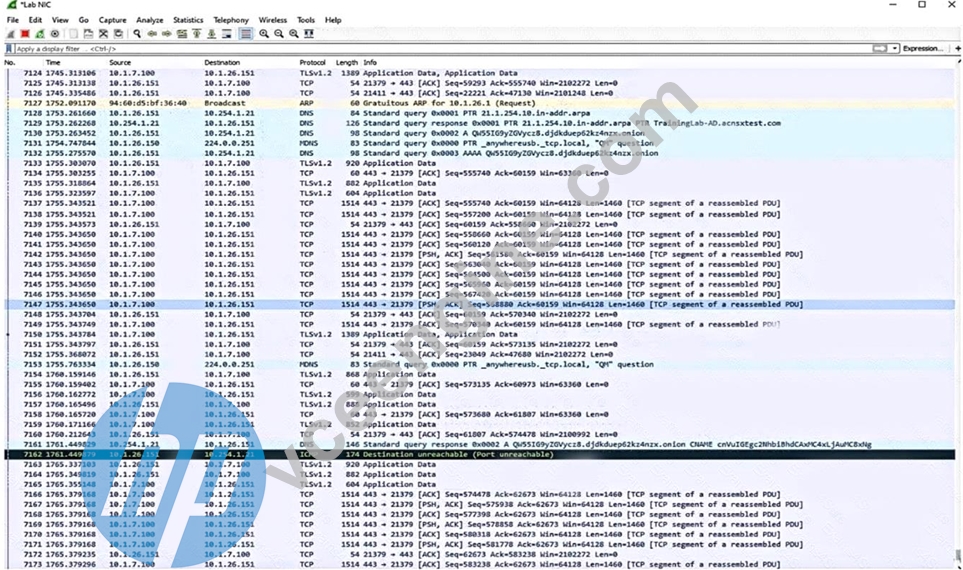
Which IP address should you record as a possibly compromised client?
- A. 10.1J.100
- B. 10.1.26.1
- C. 10.1.26.151
- D. 10.254.1.21
Answer: C
Explanation:
Explanation
The exhibit shows a screenshot of a Malwarebytes alert that indicates that a website was blocked due to compromise. The alert contains the following information:
The type of protection: Web Protection
The website that was blocked: 10.254.1.21
The port that was used: 80
The process that initiated the connection: C:\Program Files
(x86)\Google\Chrome\Application\chrome.exe
The IP address of the device that initiated the connection: 10.1.26.151 The IP address of the device that initiated the connection is the one that should be recorded as a possibly compromised client, as it indicates that the device tried to access a malicious website that could infect it with malware or steal its data. In this case, the IP address of the possibly compromised client is 10.1.26.151.
NEW QUESTION # 20
A customer requires a secure solution for connecting remote users to the corporate main site. You are designing a client-to-site virtual private network (VPN) based on Aruba VIA and Aruba MobilityControllers acting as VPN Concentrators (VPNCs). Remote users will first use the VIA client to contact the VPNCs and obtain connection settings.
The users should only be allowed to receive the settings if they are the customer's "RemoteEmployees" AD group. After receiving the settings, the VIA clients will automatically establish VPN connections, authenticating to CPPM with certificates.
What should you do to help ensure that only authorized users obtain VIA connection settings?
- A. Set up the VPNCs' VIA connection profile to use two authentication profiles, one RADIUS profile to CPPM and one LDAP profile to AD.
- B. Set up the VPNCs' VIA connection profile to use one authentication profile, which is set to the AD domain controller's hostname.
- C. Set up the VPNCs' VIA web authentication profile to use an AD domain controller as the LDAP server.
- D. Set up the VPNCs' VIA web authentication profile to use CPPM as the authentication server; set up a service on CPPM that uses AD as the authentication source.
Answer: D
NEW QUESTION # 21
A customer wants CPPM to authenticate non-802.1X-capable devices. An admin has created the service shown in the exhibits below:
What is one recommendation to improve security?
- A. Enabling caching of posture and roles
- B. Using Active Directory as the authentication source
- C. Creating and using a custom MAC-Auth authentication method
- D. Adding an enforcement policy rule that denies access to endpoints with the Conflict flaq
Answer: C
Explanation:
Explanation
MAC Authentication Bypass (MAB) is a technique that allows non-802.1X-capable devices to bypass the
802.1X authentication process and gain network access based on their MAC addresses. However, MAB has some security drawbacks, such as the possibility of MAC address spoofing or unauthorized devices being added to the network. Therefore, it is recommended to use a custom MAC-Auth authentication method that adds an additional layer of security to MAB.
A custom MAC-Auth authentication method is a method that uses a combination of the MAC address and another attribute, such as a username, password, or certificate, to authenticate the device. This way, the device needs to provide both the MAC address and the additional attribute to gain access, making it harder for an attacker to spoof or impersonate the device. A custom MAC-Auth authentication method can be created and configured in ClearPass Policy Manager (CPPM) by following the steps in the Customizing MAC Authentication - Aruba page.
NEW QUESTION # 22
Which element helps to lay the foundation for solid network security forensics?
- A. Enabling debug-level information for network infrastructure device logs
- B. Implementing 802.1X authentication on switch ports that connect to APs
- C. Ensuring that all network devices use a correct, consistent clock
- D. Enable BPDU protection and loop protection on edqe switch ports
Answer: C
Explanation:
Explanation
This is because network forensics relies on the analysis of network traffic data, which is often time-stamped by the devices that generate or transmit it. Having a synchronized and accurate clock across all network devices helps to establish a reliable timeline of events and correlate different sources of evidence12
A: Enable BPDU protection and loop protection on edge switch ports is not related to network security forensics, but rather to preventing network loops and topology changes caused by rogue switches or bridges3
B: Enabling debug-level information for network infrastructure device logs might provide more details about the network activity, but it also consumes more resources and storage, and might not be relevant or useful for forensic analysis. Moreover, debug-level information might not be available for long-term retention or legal purposes4
C: Implementing 802.1X authentication on switch ports that connect to APs is a good security practice to prevent unauthorized access to the network, but it does not directly help with network security forensics. 802.1X authentication does not capture or record network traffic data, which is the main source of evidence for network forensics
NEW QUESTION # 23
A customer requires a secure solution for connecting remote users to the corporate main site. You are designing a client-to-site virtual private network (VPN) based on Aruba VIA and Aruba Mobility Controllers acting as VPN Concentrators (VPNCs). Remote users will first use the VIA client to contact the VPNCs and obtain connection settings.
The users should only be allowed to receive the settings if they are the customer's "RemoteEmployees" AD group. After receiving the settings, the VIA clients will automatically establish VPN connections, authenticating to CPPM with certificates.
What should you do to help ensure that only authorized users obtain VIA connection settings?
- A. Set up the VPNCs' VIA connection profile to use two authentication profiles, one RADIUS profile to CPPM and one LDAP profile to AD.
- B. Set up the VPNCs' VIA connection profile to use one authentication profile, which is set to the AD domain controller's hostname.
- C. Set up the VPNCs' VIA web authentication profile to use an AD domain controller as the LDAP server.
- D. Set up the VPNCs' VIA web authentication profile to use CPPM as the authentication server; set up a service on CPPM that uses AD as the authentication source.
Answer: D
Explanation:
Explanation
The VIA web authentication profile is used to authenticate the users who want to download the VIA connection settings from the VPNCs. The VPNCs can use either an internal database or an external server (such as RADIUS or LDAP) as the authentication source for this profile. To ensure that only authorized users obtain VIA connection settings, you should use CPPM as the external server and configure a service on CPPM that uses AD as the authentication source. This way, you can leverage the role mapping and enforcement features of CPPM to check if the users belong to the "RemoteEmployees" AD group and grant or deny them access accordingly1 The other options are not correct because they do not allow you to verify the users' AD group membership before providing them with VIA connection settings. Option B would only check the users' credentials against AD, but not their group membership. Option C would only apply to the VPN connection phase, not the VIA connection settings phase. Option D would not work because the VPNCs do not support LDAP as an authentication source for VIA connection profiles2
NEW QUESTION # 24
Refer to the scenario.
# Introduction to the customer
You are helping a company add Aruba ClearPass to their network, which uses Aruba network infrastructure devices.
The company currently has a Windows domain and Windows CA. The Window CA issues certificates to domain computers, domain users, and servers such as domain controllers. An example of a certificate issued by the Windows CA is shown here.
The company is in the process of adding Microsoft Endpoint Manager (Intune) to manage its mobile clients.
The customer is maintaining the on-prem AD for now and uses Azure AD Connect to sync with Azure AD.
# Requirements for issuing certificates to mobile clients
The company wants to use ClearPass Onboard to deploy certificates automatically to mobile clients enrolled in Intune. During this process, Onboard should communicate with Azure AD to validate the clients. High availability should also be provided for this scenario; in other words, clients should be able to get certificates from Subscriber 2 if Subscriber 1 is down.
The Intune admins intend to create certificate profiles that include a UPN SAN with the UPN of the user who enrolled the device.
# Requirements for authenticating clients
The customer requires all types of clients to connect and authenticate on the same corporate SSID.
The company wants CPPM to use these authentication methods:
EAP-TLS to authenticate users on mobile clients registered in Intune
TEAR, with EAP-TLS as the inner method to authenticate Windows domain computers and the users on them To succeed, EAP-TLS (standalone or as a TEAP method) clients must meet these requirements:
Their certificate is valid and is not revoked, as validated by OCSP
The client's username matches an account in AD
# Requirements for assigning clients to roles
After authentication, the customer wants the CPPM to assign clients to ClearPass roles based on the following rules:
Clients with certificates issued by Onboard are assigned the "mobile-onboarded" role Clients that have passed TEAP Method 1 are assigned the "domain-computer" role Clients in the AD group "Medical" are assigned the "medical-staff" role Clients in the AD group "Reception" are assigned to the "reception-staff" role The customer requires CPPM to assign authenticated clients to AOS firewall roles as follows:
Assign medical staff on mobile-onboarded clients to the "medical-mobile" firewall role Assign other mobile-onboarded clients to the "mobile-other" firewall role Assign medical staff on domain computers to the "medical-domain" firewall role All reception staff on domain computers to the "reception-domain" firewall role All domain computers with no valid user logged in to the "computer-only" firewall role Deny other clients access
# Other requirements
Communications between ClearPass servers and on-prem AD domain controllers must be encrypted.
# Network topology
For the network infrastructure, this customer has Aruba APs and Aruba gateways, which are managed by Central. APs use tunneled WLANs, which tunnel traffic to the gateway cluster. The customer also has AOS-CX switches that are not managed by Central at this point.
# ClearPass cluster IP addressing and hostnames
A customer's ClearPass cluster has these IP addresses:
Publisher = 10.47.47.5
Subscriber 1 = 10.47.47.6
Subscriber 2 = 10.47.47.7
Virtual IP with Subscriber 1 and Subscriber 2 = 10.47.47.8
The customer's DNS server has these entries
cp.acnsxtest.com = 10.47.47.5
cps1.acnsxtest.com = 10.47.47.6
cps2.acnsxtest.com = 10.47.47.7
radius.acnsxtest.com = 10.47.47.8
onboard.acnsxtest.com = 10.47.47.8
The customer needs a secure way for users to enroll their new wireless clients in Intune. You are recommending a new WLAN that will provide the users with limited access for the enrollment.
You have set up captive portal for clients on this WLAN to a web page with instructions for enrolling devices.
You will need to add several hostnames to the captive portal allowlist manually.
What is one of those hostnames?
- A. The hostname used by ClearPass Policy ManaGer's RADIUS services
- B. The ClearPass Onboard hostname referenced in an Onboard provisioninG profile
- C. The hostname used by the on-prem domain controllers
- D. The ClearPass Onboard hostname referenced in Intune SCEP profiles
Answer: B
NEW QUESTION # 25
A customer has an AOS 10 architecture, which includes Aruba APs. Admins have recently enabled WIDS at the high level. They also enabled alerts and email notifications for several events, as shown in the exhibit.
Admins are complaining that they are getting so many emails that they have to ignore them, so they are going to turn off all notifications.
What is one step you could recommend trying first?
- A. Send the email notifications directly to a specific folder, and only check the folder once a week.
- B. Change the WIDS level to custom, and enable only the checks most likely to indicate real threats.
- C. Disable just the Rogue AP and Client Attack Detected alerts, as they overlap with the Infrastructure Attack Detected alert.
- D. Disable email notifications for Roque AP, but leave the Infrastructure Attack Detected and Client Attack Detected notifications on.
Answer: B
Explanation:
Explanation
According to the AOS 10 documentation1, WIDS is a feature that monitors the radio spectrum for the presence of unauthorized, rogue access points and the use of wireless attack tools. WIDS can be configured at different levels, such as low, medium, high, or custom. The higher the level, the more checks are enabled and the more alerts are generated. However, not all checks are equally relevant or indicative of real threats. Some checks may generate false positives or unnecessary alerts that can overwhelm the administrators and reduce the effectiveness of WIDS.
Therefore, one step that could be recommended to reduce the number of email notifications is to change the WIDS level to custom, and enable only the checks most likely to indicate real threats. This way, the administrators can fine-tune the WIDS settings to suit their network environment and security needs, and avoid getting flooded with irrelevant or redundant alerts. Option C is the correct answer.
Option A is incorrect because sending the email notifications directly to a specific folder and only checking the folder once a week is not a good practice for security management. This could lead to missing or ignoring important alerts that require immediate attention or action. Moreover, this does not solve the problem of getting too many emails in the first place.
Option B is incorrect because disabling email notifications for Rogue AP, but leaving the Infrastructure Attack Detected and Client Attack Detected notifications on, is not a sufficient solution. Rogue APs are unauthorized access points that can pose a serious security risk to the network, as they can be used to intercept or steal sensitive data, launch attacks, or compromise network performance. Therefore, disabling email notifications for Rogue APs could result in missing critical alerts that need to be addressed.
Option D is incorrect because disabling just the Rogue AP and Client Attack Detected alerts, as they overlap with the Infrastructure Attack Detected alert, is not a valid assumption. The Infrastructure Attack Detected alert covers a broad range of attacks that target the network infrastructure, such as deauthentication attacks, spoofing attacks, denial-of-service attacks, etc. The Rogue AP and Client Attack Detected alerts are more specific and focus on detecting and classifying rogue devices and clients that may be involved in such attacks.
Therefore, disabling these alerts could result in losing valuable information about the source and nature of the attacks.
NEW QUESTION # 26
Refer to the scenario.
A customer has an AOS10 architecture that is managed by Aruba Central. Aruba infrastructure devices authenticate clients to an Aruba ClearPass cluster.
In Aruba Central, you are examining network traffic flows on a wireless IoT device that is categorized as
"Raspberry Pi" clients. You see SSH traffic. You then check several more wireless IoT clients and see that they are sending SSH also.
You want a fast way to find a list of all the IoT clients that have used SSH.
What step can you take?
- A. Run a search for SSH traffic and loT client IDs in Aruba ClearPass Policy Manager's (CPPM's) accounting information.
- B. Create and apply a Central client profile tag that selects the SSH application and the clients' category.
- C. Use Central's Gateway IDS/IPS Security Dashboard to search for SSH events and sources.
- D. Use Central's Live Events monitoring tool to detect which clients meet the desired criteria.
Answer: D
Explanation:
Explanation
This is because the Live Events monitoring tool is a feature that allows you to view and filter real-time events and alerts from your network devices and clients on Aruba Central. You can use the Live Events monitoring tool to detect which IoT clients have used SSH by applying the following filters:
Category: IoT
Application: SSH
The Live Events monitoring tool will then display a list of all the IoT clients that have used SSH, along with other information such as their IP address, MAC address, hostname, SSID, AP name, etc. You can also export the list as a CSV file for further analysis or reporting.
A: Create and apply a Central client profile tag that selects the SSH application and the clients' category. This is not the fastest way to find a list of all the IoT clients that have used SSH because creating and applying a client profile tag is a process that involves several steps and might take some time to take effect. A client profile tag is a feature that allows you to group and classify clients based on various criteria, such as device type, OS, category, application, etc. To create and apply a client profile tag that selects the SSH application and the clients' category, you need to do the following:
Navigate to Clients > Client Profile Tags on Aruba Central.
Click Add Tag and enter a name and description for the tag.
Click Add Rule and select Application as the attribute and SSH as the value.
Click Add Rule again and select Category as the attribute and IoT as the value.
Click Save to create the tag.
Navigate to Clients > Client List on Aruba Central.
Select the clients that you want to apply the tag to and click Assign Tag.
Select the tag that you created and click Apply.
After applying the tag, you can then filter the client list by the tag name and see a list of all the IoT clients that have used SSH. However, this method might not be as fast or accurate as using the Live Events monitoring tool, as it depends on how often the client profile tags are updated and synchronized with Aruba Central.
B: Run a search for SSH traffic and loT client IDs in Aruba ClearPass Policy Manager's (CPPM's) accounting information. This is not the fastest way to find a list of all the IoT clients that have used SSH because running a search in CPPM's accounting information is a process that involves accessing another system and querying a large amount of data. Accounting information is a feature that allows CPPM to collect and store data about network sessions, such as start time, end time, duration, bytes sent/received, etc. To run a search for SSH traffic and IoT client IDs in CPPM's accounting information, you need to do the following:
Log in to CPPM and navigate to Monitoring > Live Monitoring > Accounting.
Click on Advanced Search and enter SSH as the value for Service Name.
Click on Add Filter and enter IoT as the value for Endpoint Category.
Click on Search to run the query.
The query will then return a list of all the network sessions that involved SSH traffic and IoT clients. However, this method might not be as fast or convenient as using the Live Events monitoring tool, as it requires logging in to another system and searching through a large amount of data that might not be relevant or current.
D: Use Central's Gateway IDS/IPS Security Dashboard to search for SSH events and sources. This is not a valid way to find a list of all the IoT clients that have used SSH because the Gateway IDS/IPS Security Dashboard is a feature that only applies to wired network devices connected to Aruba gateways, not wireless devices connected to Aruba APs. The Gateway IDS/IPS Security Dashboard is a feature that allows you to monitor and manage security events and alerts from your wired network devices on Aruba Central. You can use the Gateway IDS/IPS Security Dashboard to search for security events related to SSH, such as brute force attacks or unauthorized access attempts, but not for normal SSH traffic from wireless IoT devices. Therefore, this method will not help you find a list of all the IoT clients that have used SSH.
NEW QUESTION # 27
Refer to the exhibit.
Aruba ClearPass Policy Manager (CPPM) is using the settings shown in the exhibit. You reference the tag shown in the exhibit in enforcement policies related to NASes of several types, including Aruba APs, Aruba gateways, and AOS-CX switches.
What should you do to ensure that clients are reclassified and receive the correct treatment based on the tag?
- A. Enable profiling in each service using one of these enforcement profiles. Set the profiling action to the correct one for the NASes using that service.
- B. Set the Tags Update Action to No Action. Then instead enable the RADIUS CoAs using enforcement profiles in the rules that match clients with the tag shown in the exhibit.
- C. Change the RADIUS action to [Aruba Wireless -Terminate Session] which is supported by all the NASes in question.
- D. Change the RADIUS action to [Aruba Wireless - Bounce Switch Port] which is supported by all the NASes in question.
Answer: A
Explanation:
Explanation
According to the ClearPass Policy Manager User Guide1, the tag shown in the exhibit is a Device Insight tag, which is used to classify and identify devices based on their behavior and characteristics. Device Insight tags can be used as conditions in enforcement policies to apply different actions or roles to devices based on their tags. However, in order to ensure that devices are reclassified and receive the correct treatment based on their tags, profiling must be enabled in each service that uses one of these enforcement profiles. Profiling is a feature that allows ClearPass to dynamically discover and profile devices on the network, and update their attributes and tags accordingly. Profiling also allows ClearPass to send RADIUS Change of Authorization (CoA) messages to the network access servers (NASes) that control the access of the devices, and instruct them to reauthenticate or terminate the sessions of the devices that have changed their tags. The profiling action must be set to the correct one for the NASes using that service, as different NASes may support different types of CoA messages. Therefore, option C is the correct answer.
NEW QUESTION # 28
Refer to the exhibit.
Which IP address should you record as a possibly compromised client?
- A. 10.1J.100
- B. 10.1.26.1
- C. 10.1.26.151
- D. 10.254.1.21
Answer: C
NEW QUESTION # 29
You need to install a certificate on a standalone Aruba Mobility Controller (MC). The MC will need to use the certificate for the Web UI and for implementing RadSec with Aruba ClearPass Policy Manager. You have been given a certificate with these settings:
Subject: CN=mc41.site94.example.com
* No SANs
* Issuer: CN=ca41.example.com
EKUs: Server Authentication, Client Authentication
What issue does this certificate have for the purposes for which the certificate is intended?
- A. It has conflicting EKUs.
- B. It lacks a DNS SAN.
- C. It is issued by a private CA.
- D. It specifies domain info in the CN field instead of the DC field.
Answer: B
Explanation:
Explanation
A DNS SAN (Subject Alternative Name) is an extension of the X.509 certificate standard that allows specifying additional hostnames or IP addresses that the certificate can be used for. A DNS SAN is useful for validating the identity of the server or client that presents the certificate, especially when the common name (CN) field does not match the hostname or IP address of the server or client.
In this case, the certificate has a CN of mc41.site94.example.com, which is the fully qualified domain name (FQDN) of the standalone Aruba Mobility Controller (MC). However, this CN may not match the hostname or IP address that the MC uses for the Web UI or for implementing RadSec with Aruba ClearPass Policy Manager. For example, if the MC uses a different FQDN, such as mc41.example.com, or an IP address, such as 192.168.1.41, for these purposes, then the certificate would not be valid for them. Therefore, the certificate should have a DNS SAN that includes all the possible hostnames or IP addresses that the MC may use for the Web UI and RadSec.
NEW QUESTION # 30
You are designing an Aruba ClearPass Policy Manager (CPPM) solution for a customer. You learn that the customer has a Palo Alto firewall that filters traffic between clients in the campus and the data center.
Which integration can you suggest?
- A. Sending Syslogs from the firewall to CPPM to signal CPPM to change the authentication status for misbehaving clients
- B. Establishing a double layer of authentication at both the campus edge and the data center DMZ
- C. Importing the firewall's rules to program downloadable user roles for AOS-CX switches more quickly
- D. Importing clients' MAC addresses to configure known clients for MAC authentication more quickly
Answer: A
NEW QUESTION # 31
Refer to the scenario.
A customer is using an AOS 10 architecture with Aruba APs and Aruba gateways (two per site). Admins have implemented auto-site clustering for gateways with the default gateway mode disabled. WLANs use tunneled mode to the gateways.
The WLAN security is WPA3-Enterprise with authentication to an Aruba ClearPass Policy Manager (CPPM) cluster VIP. RADIUS communications use RADIUS, not RadSec.
For which devices does CPPM require network device entries?
- A. For gateways' actual IP addresses and AP clusters' virtual IP addresses for dynamic authorization
- B. ForAP clusters'virtual IP addresses
- C. Forgateways' actual IP addresses and dynamic authorization VRRP addresses
- D. For APs' actual IP addresses
Answer: C
NEW QUESTION # 32
A customer needs you to configure Aruba ClearPass Policy Manager (CPPM) to authenticate domain users on domain computers. Domain users, domain computers, and domain controllers receive certificates from a Windows CA. CPPM should validate these certificates and verify that the users and computers have accounts in Windows AD. The customer requires encryption for all communications between CPPM and the domain controllers.
You have imported the root certificate for the Windows CA to the ClearPass CA Trust list.
Which usages should you add to it based on these requirements?
- A. EAP and AD/LDAP Server
- B. Radec and Aruba infrastructure
- C. LDAP and Aruba infrastructure
- D. EAP and Radsec
Answer: D
NEW QUESTION # 33
When would you implement BPDU protection on an AOS-CX switch port versus BPDU filtering?
- A. Use BPDU protection on edge ports to protect against rogue devices when the switch implements MSTP; use BPDU filtering to protect against rogue devices when the switch implements PVSTP+.
- B. Use BPDU protection on edge ports to permanently lock out rogue devices; use BPDU filtering on edge ports to temporarily lock out rogue devices.
- C. Use BPDU protection on inter-switch ports to ensure that they are selected as root; use BPDU filtering on edge ports to prevent rogue devices from connecting.
- D. Use BPDU protection on edge ports to prevent rogue devices from connecting; use BPDU filtering on inter-switch ports for specialized use cases.
Answer: D
NEW QUESTION # 34
You are working with a developer to design a custom NAE script for a customer. The NAE agent should trigger an alert when ARP inspection drops packets on a VLAN. The customer wants the admins to be able to select the correct VLAN ID for the agent to monitor when they create the agent.
What should you tell the developer to do?
- A. Define a VLAN ID parameter; reference that parameter when defining the monitor URI.
- B. Use a callback action to collect the ID of the VLAN on which admins have enabled NAE monitoring.
- C. Create multiple monitors within the script from which admins can select when they create the agent.
- D. Use this variable, %{vlan-id} when defining the monitor URI in the NAE agent script.
Answer: A
Explanation:
Explanation
A custom NAE script is a Python script that defines the monitors, the alert-trigger logic, and the remedial actions for an NAE agent. A monitor is a URI that specifies the data source and the data type that the NAE agent should collect and analyze. For example, to monitor the ARP inspection statistics on a VLAN, the monitor URI would be something like this:
where <vlan-id> is the ID of the VLAN to be monitored.
To allow the admins to select the correct VLAN ID for the agent to monitor when they create the agent, you need to define a VLAN ID parameter in the NAE script. A parameter is a variable that can be set by the user when creating or modifying an agent. A parameter can be referenced in other parts of the script by using the syntax ${parameter-name}. For example, to define a VLAN ID parameter and reference it in the monitor URI, you would write something like this:
This way, when the admins create or modify the agent, they can enter the VLAN ID that they want to monitor, and the NAE script will use that value in the monitor URI.
You can find more information about how to write custom NAE scripts and use parameters in the NAE Scripting Guide
NEW QUESTION # 35
......
HPE6-A84 certification exam is intended for experienced network security professionals who want to enhance their skills and knowledge in Aruba security solutions. Candidates who pass HPE6-A84 exam will gain a deep understanding of network security concepts and techniques, as well as gain practical experience in implementing and managing Aruba security solutions.
HPE6-A84 Premium PDF & Test Engine Files with 60 Questions & Answers: https://www.vceengine.com/HPE6-A84-vce-test-engine.html
Get 100% Real HPE6-A84 Accurate & Verified Answers As Seen in the Real Exam!: https://drive.google.com/open?id=1lNKuA2W55G0Yl9oOa72fFDLMoFA2QmvX
