

[2025] NSE7_EFW-7.2 by NSE 7 Network Security Architect Actual Free Exam Practice Test
Free NSE 7 Network Security Architect NSE7_EFW-7.2 Exam Question
Fortinet NSE7_EFW-7.2 Exam Syllabus Topics:
| Topic | Details |
|---|---|
| Topic 1 |
|
| Topic 2 |
|
| Topic 3 |
|
| Topic 4 |
|
| Topic 5 |
|
NEW QUESTION # 24
Refer to the exhibit, which shows the output of a BGP summary.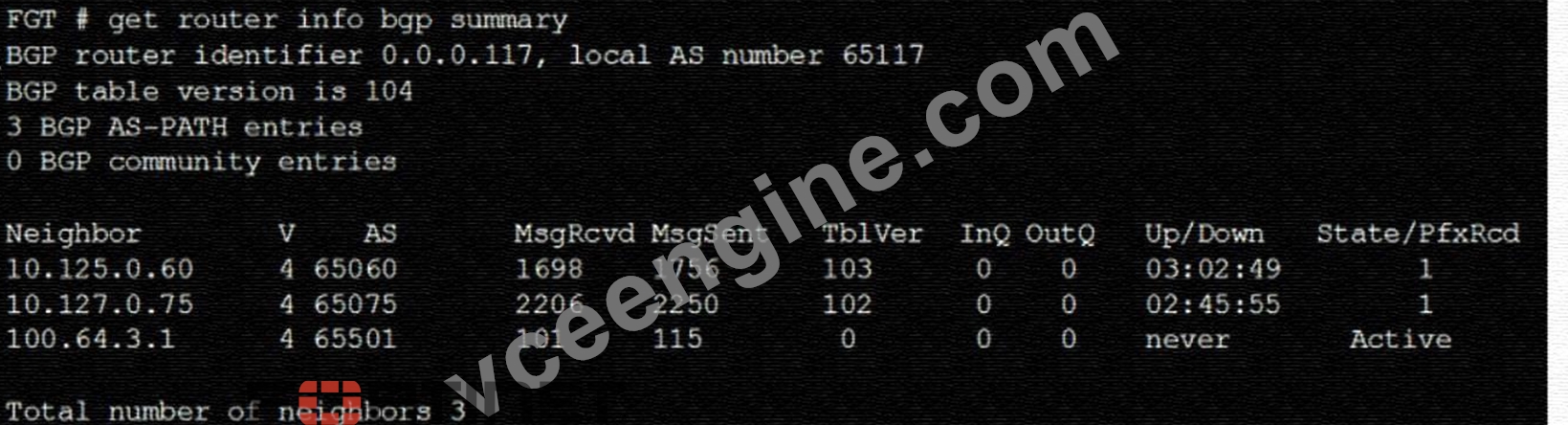
What two conclusions can you draw from this BGP summary? (Choose two.)
- A. The router 100. 64. 3. 1 has the parameter bfd set to enable.
- B. External BGP (EBGP) exchanges routing information.
- C. The neighbors displayed are linked to a local router with the neighbor-range set to a value of 4.
- D. The BGP session with peer 10. 127. 0. 75 is established.
Answer: B,D
Explanation:
The output of the BGP (Border Gateway Protocol) summary shows details about the BGP neighbors of a router, their Autonomous System (AS) numbers, the state of the BGP session, and other metrics like messages received and sent.
From the BGP summary provided:
A).External BGP (EBGP) exchanges routing information.This conclusion can be inferred because the AS numbers for the neighbors are different from the local AS number (65117), which suggests that these are external connections.
B).The BGP session with peer 10.127.0.75 is established.This is indicated by the state/prefix received column showing a numeric value (1), which typically means that the session is established and a number of prefixes has been received.
C).The router 100.64.3.1 has the parameter bfd set to enable.This cannot be concluded directly from the summary without additional context or commands specifically showing BFD (Bidirectional Forwarding Detection) configuration.
D).The neighbors displayed are linked to a local router with the neighbor-range set to a value of 4.The neighbor-range concept does not apply here; the value 4 in the 'V' column stands for the BGP version number, which is typically 4.
NEW QUESTION # 25
Which two statements about IKE vision 2 are true? (Choose two.)
- A. Phase 1 includes main mode
- B. It exchanges a minimum of four messages to establish a secure tunnel
- C. It supports the extensible authentication protocol (EAP)
- D. It supports the XAuth protocol.
Answer: B,C
Explanation:
IKE version 2 supports the extensible authentication protocol (EAP), which allows for more flexible and secure authentication methods1. IKE version 2 also exchanges a minimum of four messages toestablish a secure tunnel, which is more efficient than IKE version 12. References: = IKE settings | FortiClient 7.2.2 - Fortinet Documentation, Technical Tip: How to configure IKE version 1 or 2 ... - Fortinet Community
NEW QUESTION # 26
You contoured an address object on the tool fortiGate in a Security Fabric. This object is not synchronized with a downstream device. Which two reasons could be the cause? (Choose two)
- A. The address object on the tool FortiGate has fabric-object set to disable
- B. The downstream FortiGate has configuration-sync set to local
- C. The downstream TortiGate has fabric-object-unification set to local
- D. The root FortiGate has configuration-sync set to enable
Answer: A,C
Explanation:
Option A is correct because the address object on the tool FortiGate will not be synchronized with the downstream devices if it has fabric-object set to disable. This option controls whether the address object is shared with other FortiGate devices in the Security Fabric or not1.
Option C is correct because the downstream FortiGate will not receive the address object from the tool FortiGate if it has fabric-object-unification set to local. This option controls whether the downstream FortiGate uses the address objects from the root FortiGate or its own local address objects2.
Option B is incorrect because the root FortiGate has configuration-sync set to enable by default, which means that it will synchronize the address objects with the downstream devices unless they are disabled by the fabric-object option3.
Option D is incorrect because the downstream FortiGate has configuration-sync set to local by default, which means that it will receive the address objects from the root FortiGate unless they are overridden by the fabric-object-unification option4. Reference: =
1: Group address objects synchronized from FortiManager5
2: Security Fabric address object unification6
3: Configuration synchronization7
4: Configuration synchronization7
5: Security Fabric - Fortinet Documentation
NEW QUESTION # 27
Refer to the exhibit, which shows an ADVPN network.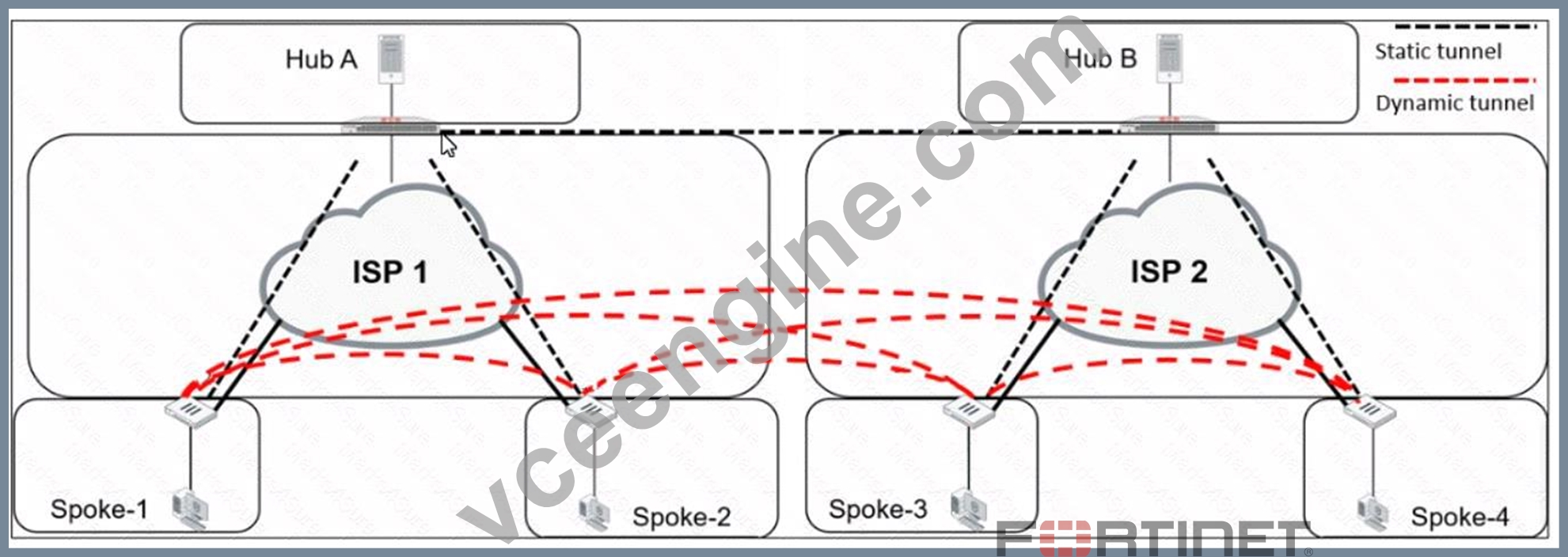
Which VPN phase 1 parameters must you configure on the hub for the ADVPN feature to function? (Choose two.)
- A. set auto-discovery-forwarder enable
- B. set add-route enable
- C. set auto-discovery-sender enable
- D. set auto-discovery-receiver enable
Answer: A,D
Explanation:
For the ADVPN feature to function properly on the hub, the following phase 1 parameters must be configured:
A). set auto-discovery-forwarder enable: This enables the hub to forward shortcut information to the spokes, which is essential for them to establish direct tunnels.
C). set auto-discovery-receiver enable: This allows the hub to receive shortcut offers from the spokes.
This information is corroborated by the Fortinet documentation, which explains that in an ADVPN setup, the hub must be able to both forward and receive shortcut information for dynamic tunnel creation between spokes.
NEW QUESTION # 28
Exhibit.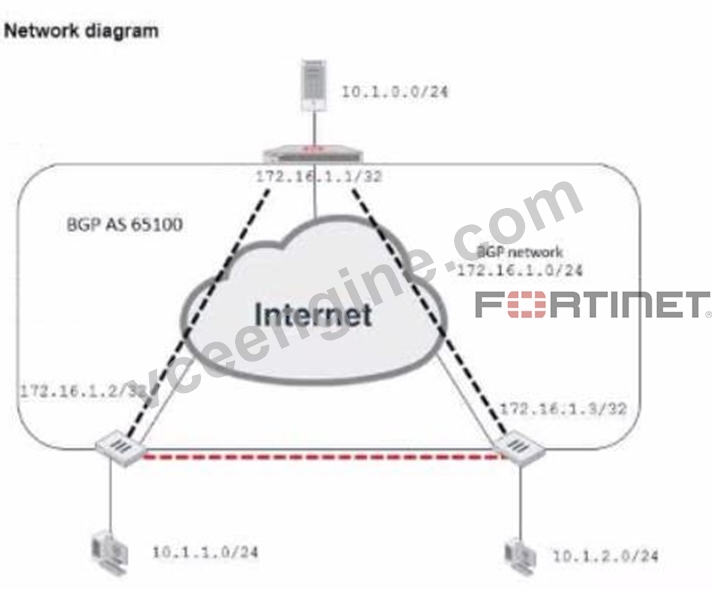
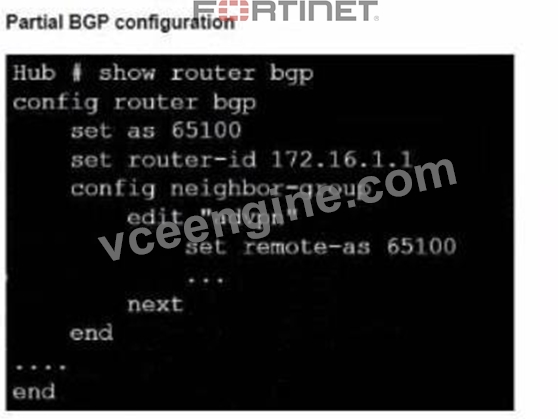
Refer to the exhibit, which contains an ADVPN network diagram and a partial BGP con figuration Which two parameters Should you configure in config neighbor range? (Choose two.)
- A. set neighbor-group advpn
- B. set prefix 10.1.0 255.255.254.0
- C. set prefix 172.16.1.0 255.255.255.0
- D. set route reflector-client enable
Answer: A,B
Explanation:
In the ADVPN configuration for BGP, you should specify the prefix that the neighbors can advertise. Option A is correct as you would configure the BGP network prefix that should be advertised to the neighbors, which matches the BGP network in the diagram. Option C is also correct since you should reference the neighbor group configured for the ADVPN setup within the BGP configuration.
NEW QUESTION # 29
Exhibit.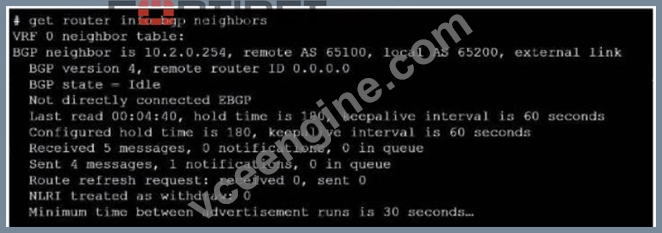
Refer to the exhibit, which provides information on BGP neighbors.
Which can you conclude from this command output?
- A. The router are in the number to match the remote peer.
- B. BGP is attempting to establish a TCP connection with the BGP peer.
- C. You must change the AS number to match the remote peer.
- D. The bfd configuration to set to enable.
Answer: B
Explanation:
The BGP state is "Idle", indicating that BGP is attempting to establish a TCP connection with the peer. This is the first state in the BGP finite state machine, and it means that no TCP connection has been established yet.
If the TCP connection fails, the BGP state will reset to either active or idle, depending on the configuration. References: You can find more information about BGP states and troubleshooting in the following Fortinet Enterprise Firewall 7.2 documents:
* Troubleshooting BGP
* How BGP works
NEW QUESTION # 30
Exhibit.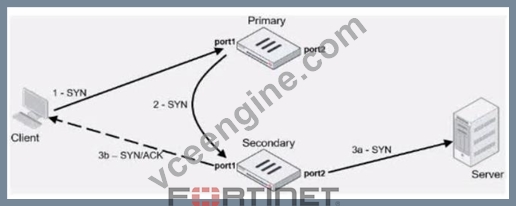
Refer to the exhibit, which contains an active-active toad balancing scenario.
During the traffic flow the primary FortiGate forwards the SYN packet to the secondary FortiGate.
What is the destination MAC address or addresses when packets are forwarded from the primary FortiGate to the secondary FortiGate?
- A. Secondary physical MAC port2 then virtual MAC port2
- B. Secondary physical MAC port1
- C. Secondary virtual MAC port1 then physical MAC port1
- D. Secondary virtual MAC port1
Answer: B
Explanation:
In an active-active load balancing scenario, when the primary FortiGate forwards the SYN packet to the secondary FortiGate, the destination MAC address would be the secondary's physical MAC on port1, as the packet is being sent over the network and the physical MAC is used for layer 2 transmissions.
NEW QUESTION # 31
Refer to the exhibit, which contains a partial OSPF configuration.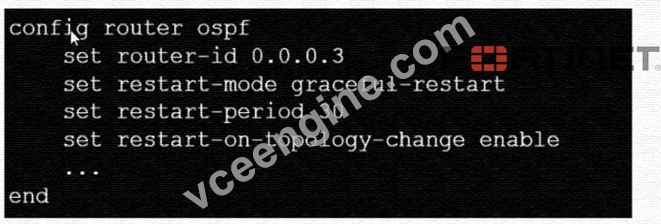
What can you conclude from this output?
- A. The restarting router sends gratuitous ARP for 30 seconds.
- B. The router sends grace LSAs before it restarts.
- C. Neighbors maintain communication with the restarting router.
- D. FortiGate restarts if the topology changes.
Answer: B
Explanation:
From the partial OSPF (Open Shortest Path First) configuration output:
B). The router sends grace LSAs before it restarts: This is implied by the command 'set restart-mode graceful-restart'. When OSPF is configured with graceful restart, the router sends grace LSAs (Link State Advertisements) to inform its neighbors that it is restarting, allowing for a seamless transition without recalculating routes.
Fortinet documentation on OSPF configuration clearly states that enabling graceful restart mode allows the router to maintain its adjacencies and routes during a brief restart period.
NEW QUESTION # 32
Refer to the exhibit, which shows two configured FortiGate devices and peering over FGSP.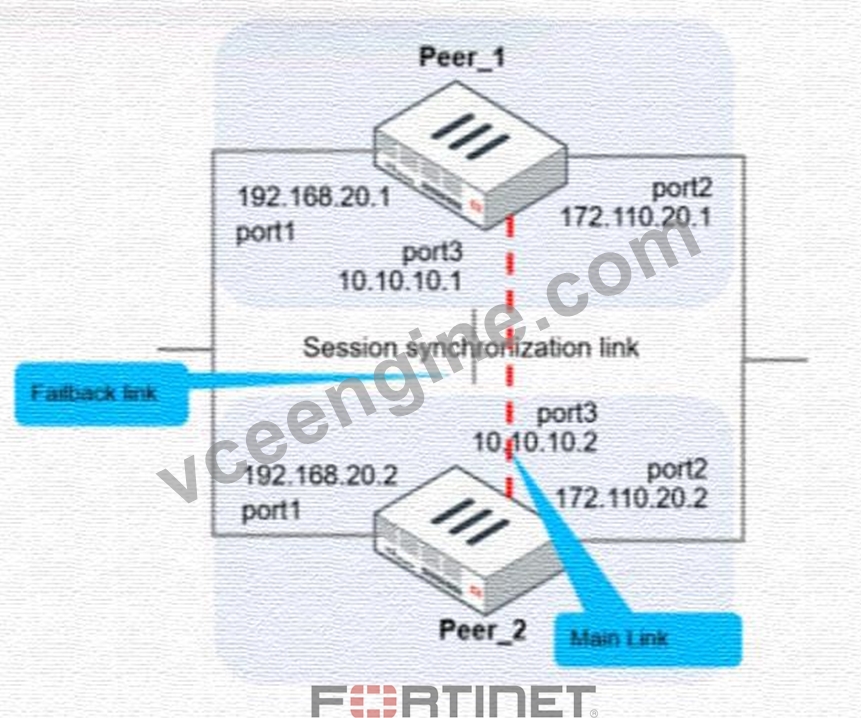
The main link directly connects the two FortiGate devices and is configured using the set session-syn-dev <interface> command.
What is the primary reason to configure the main link?
- A. To have both sessions and configuration synchronization in layer 2
- B. To have both sessions and configuration synchronization in layer 3
- C. To have only configuration synchronization in layer 3
- D. To load balance both sessions and configuration synchronization between layer 2 and 3
Answer: B
Explanation:
The primary purpose of configuring a main link between the devices is to synchronize session information so that if one unit fails, the other can continue processing traffic without dropping active sessions.
A).To have both sessions and configuration synchronization in layer 2.This is incorrect because FGSP is used for session synchronization, not configuration synchronization.
B).To load balance both sessions and configuration synchronization between layer 2 and 3.FGSP does not perform load balancing and is not used for configuration synchronization.
C).To have only configuration synchronization in layer 3.The main link is not used solely for configuration synchronization.
D).To have both sessions and configuration synchronization in layer 3.The main link in an FGSP setup is indeed used to synchronize session information across the devices, and it operates at layer 3 since it uses IP addresses to establish the peering.
NEW QUESTION # 33
Exhibit.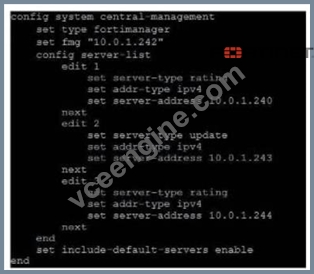
Refer to exhibit, which shows a central management configuration
Which server will FortiGate choose for web filler rating requests if 10.0.1.240 is experiencing an outage?
- A. 10.0.1.242
- B. Public FortiGuard servers
- C. 10.0.1.243
- D. 10.0.1.244
Answer: D
Explanation:
In the event of an outage at 10.0.1.240, the FortiGate will choose the next server in the sequence for web filter rating requests, which is 10.0.1.244 according to the configuration shown in the exhibit. This is because the server list is ordered by priority, and the server with the lowest priority number is chosen first. If that server is unavailable, the next server with the next lowest priority number is chosen, and so on. The public FortiGuard servers are only used if the include-default-servers option is enabled and all the custom servers are unavailable. Reference := Fortinet Enterprise Firewall Study Guide for FortiOS 7.2, page 132.
NEW QUESTION # 34
Which two statements about the Security fabric are true? (Choose two.)
- A. Only the root FortiGate collects network topology information and forwards it to FortiAnalyzer
- B. FortiGate uses the FortiTelemetry protocol to communicate with FortiAnatyzer.
- C. Only FortiGate devices with configuration-sync receive and synchronize global CMDB objects that the toot FortiGate sends
- D. Only the root FortiGate sends logs to FortiAnalyzer
Answer: A,B
Explanation:
In the Security Fabric, only the root FortiGate sends logs to FortiAnalyzer (B). Additionally, only FortiGate devices with configuration-sync enabled receive and synchronize global Central Management Database (CMDB) objects that the root FortiGate sends (C). FortiGate uses the FortiTelemetry protocol to communicate with other FortiGates, not FortiAnalyzer (A). The last option (D) is incorrect as all FortiGates can collect and forward network topology information to FortiAnalyzer.
References:
* FortiOS Handbook - Security Fabric
NEW QUESTION # 35
Refer to the exhibit, which contains a partial OSPF configuration.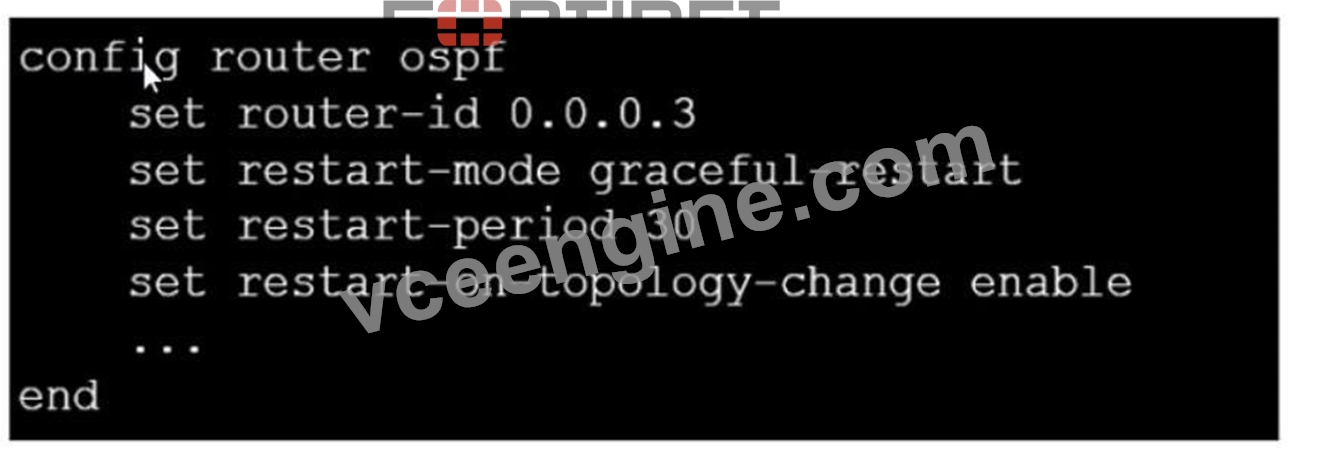
What can you conclude from this output?
- A. The restarting router sends gratuitous ARP for 30 seconds.
- B. FortiGate restarts if the topology changes.
- C. The router sends grace LSAs before it restarts.
- D. Neighbors maintain communication with the restarting router.
Answer: D
Explanation:
From the partial OSPF (Open Shortest Path First) configuration output:
B: The router sends grace LSAs before it restarts: This is implied by the command 'set restart-mode graceful- restart'. When OSPF is configured with graceful restart, the router sends grace LSAs (Link State Advertisements) to inform its neighbors that it is restarting, allowing for a seamless transition without recalculating routes.
Fortinet documentation on OSPF configuration clearly states that enabling graceful restart mode allows the router to maintain its adjacencies and routes during a brief restart period.
NEW QUESTION # 36
Which, three conditions are required for two FortiGate devices to form an OSPF adjacency? (Choose three.)
- A. OSPF interface priority settings are unique
- B. OSPF link costs match
- C. OSPF interface network types match
- D. Authentication settings match
- E. OSPF router IDs are unique
Answer: C,D,E
Explanation:
Option A is correct because the OSPF interface network types determine how the routers form adjacencies and exchange LSAs on a network segment. The network types must match for the routers to become neighbors1.
Option B is correct because the OSPF router IDs are used to identify each router in the OSPF domain and to establish adjacencies. The router IDs must be unique for the routers to become neighbors2.
Option E is correct because the authentication settings control how the routers authenticate each other before exchanging OSPF packets. The authentication settings must match for the routers to become neighbors3.
Option C is incorrect because the OSPF interface priority settings are used to elect the designated router (DR) and the backup designated router (BDR) on a broadcast or non-broadcast multi-access network. The priority settings do not have to be unique for the routers to become neighbors, but they affect the DR/BDR election process4.
Option D is incorrect because the OSPF link costs are used to calculate the shortest path to a destination network based on the bandwidth of the links. The link costs do not have to match for the routers to become neighbors, but they affect the routing decisions5. Reference: =
1: OSPF network types
2: OSPF router ID
3: OSPF authentication
4: OSPF interface priority
5: OSPF link cost
NEW QUESTION # 37
Refer to the exhibit, which shows a network diagram.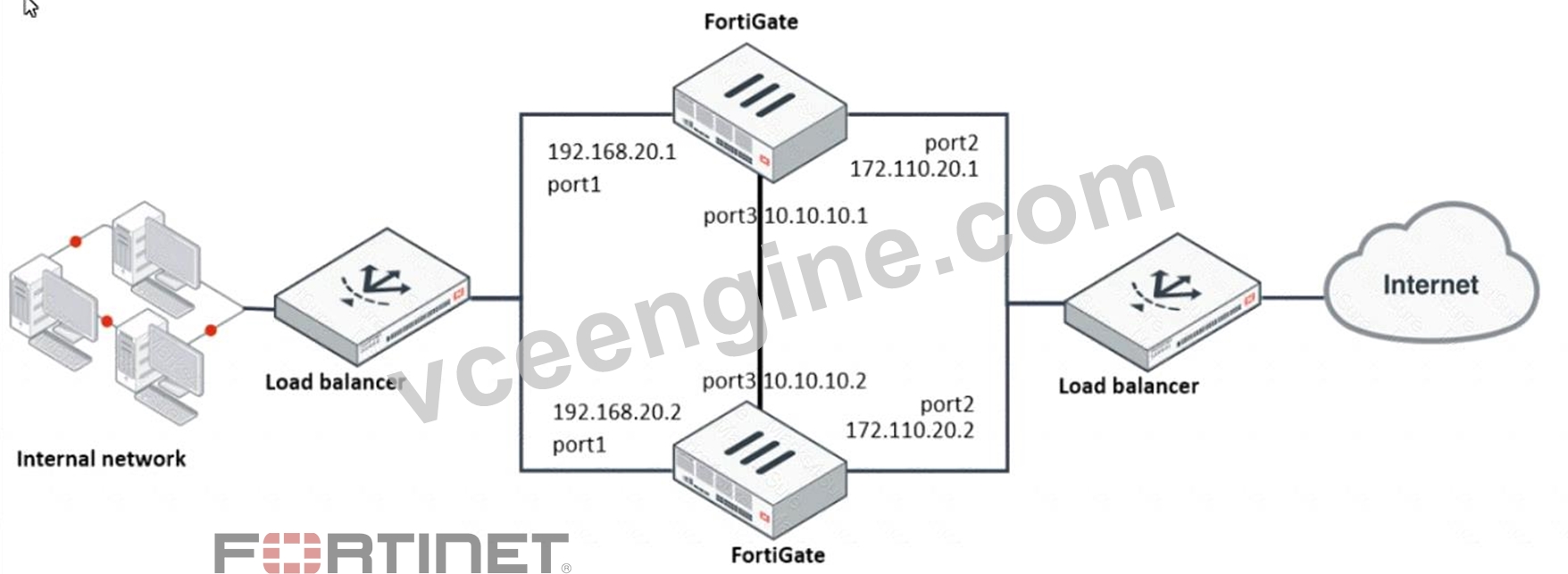
Which protocol should you use to configure the FortiGate cluster?
- A. FGCP in active-active mode
- B. VRRP
- C. OFGSP
- D. FGCP in active-passive mode
Answer: D
Explanation:
Given the network diagram and the presence of two FortiGate devices, the Fortinet Gate Clustering Protocol (FGCP) in active-passive mode is the most appropriate for setting up a FortiGate cluster. FGCP supports high availability configurations and is designed to allow one FortiGate to seamlessly take over if the other fails, providing continuous network availability. This is supported by Fortinet documentation for high availability configurations using FGCP.
NEW QUESTION # 38
Exhibit.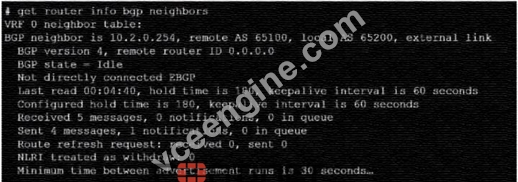
Refer to the exhibit, which provides information on BGP neighbors.
Which can you conclude from this command output?
- A. The router are in the number to match the remote peer.
- B. BGP is attempting to establish a TCP connection with the BGP peer.
- C. You must change the AS number to match the remote peer.
- D. The bfd configuration to set to enable.
Answer: B
Explanation:
The BGP state is "Idle", indicating that BGP is attempting to establish a TCP connection with the peer. This is the first state in the BGP finite state machine, and it means that no TCP connection has been established yet. If the TCP connection fails, the BGP state will reset to either active or idle, depending on the configuration. References: You can find more information about BGP states and troubleshooting in the following Fortinet Enterprise Firewall 7.2 documents:
* Troubleshooting BGP
* How BGP works
NEW QUESTION # 39
An administrator has configured two fortiGate devices for an HA cluster. While testing HA failover, the administrator notices that some of the switches in the network continue to send traffic to the former primary device What can the administrator do to fix this problem?
- A. Configure set link -failed signal enable under-config system ha on both Cluster members
- B. Configure set send-garp-on-failover enables under config system ha on both cluster members
- C. Configure remote Iink monitoring to detect an issue in the forwarding path
- D. Verify that the speed and duplex settings match between me FortiGate interfaces and the connected switch ports
Answer: B
NEW QUESTION # 40
Refer to the exhibit, which contains information about an IPsec VPN tunnel.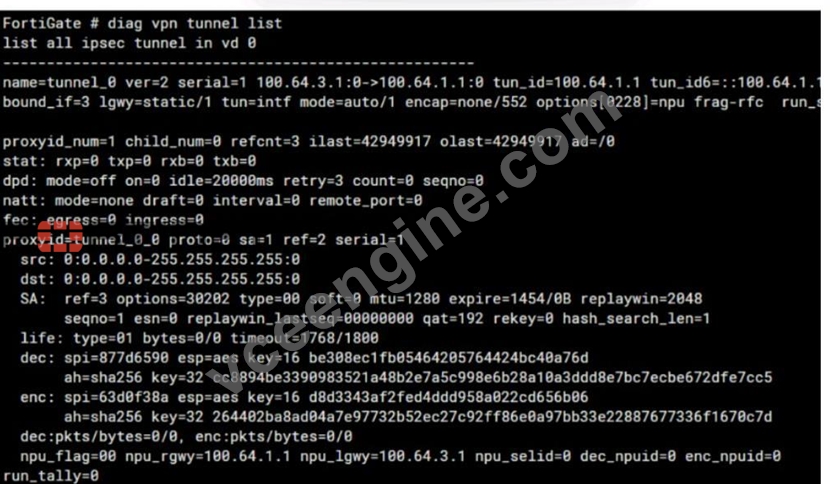
What two conclusions can you draw from the command output? (Choose two.)
- A. Dead peer detection is set to enable.
- B. Forward error correction in phase 2 is set to enable.
- C. The IKE version is 2.
- D. Both IPsec SAs are loaded on the kernel.
Answer: C,D
Explanation:
From the command output shown in the exhibit:
B: The IKE version is 2: This can be deduced from the presence of 'ver=2' in the output, which indicates that IKEv2 is being used.
C: Both IPsec SAs are loaded on the kernel: This is indicated by the line 'npu flags=0x0/0', suggesting that no offload to NPU is occurring, and hence, both Security Associations are loaded onto the kernel for processing.
Fortinet documentation specifies that the version of IKE (Internet Key Exchange) used and the loading of IPsec Security Associations can be verified through the diagnostic commands related to VPN tunnels.
NEW QUESTION # 41
......
Fortinet NSE7_EFW-7.2 Actual Questions and Braindumps: https://www.vceengine.com/NSE7_EFW-7.2-vce-test-engine.html
NSE7_EFW-7.2 dumps & NSE 7 Network Security Architect sure practice dumps: https://drive.google.com/open?id=1b27jGMh4WtZ8H0hhQq_1MFlll7cc6_8y
